Faded ink brought back, letter by letter
Contrast is the easy half. The hard half is doing it without turning a thin serif into a blob or inventing a character that was never there. Faded text repair works at stroke level: it finds what remains of each letterform and restores its density, then reads the result back to prove the words still say what they said.
- stroke
- recovered at letter level
- 0
- characters invented
- read-back
- on every restored page
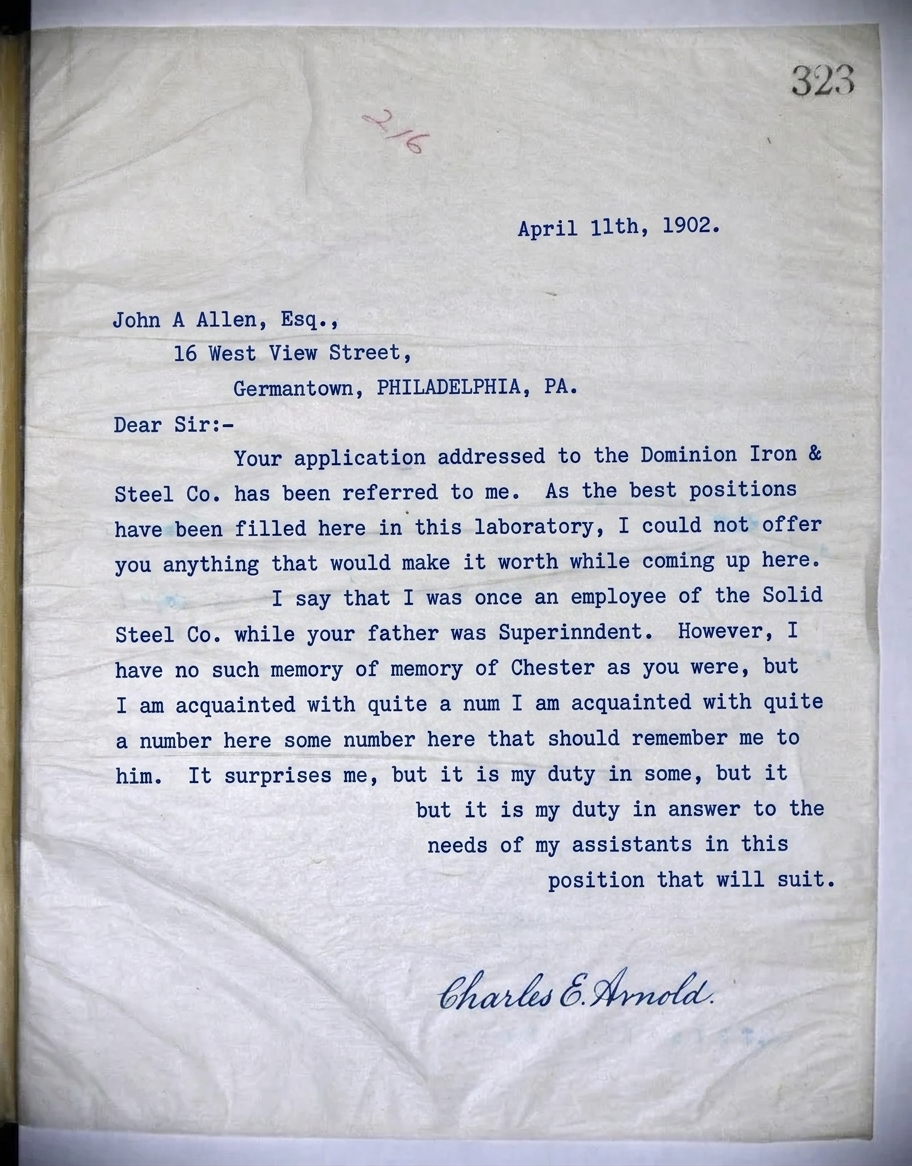
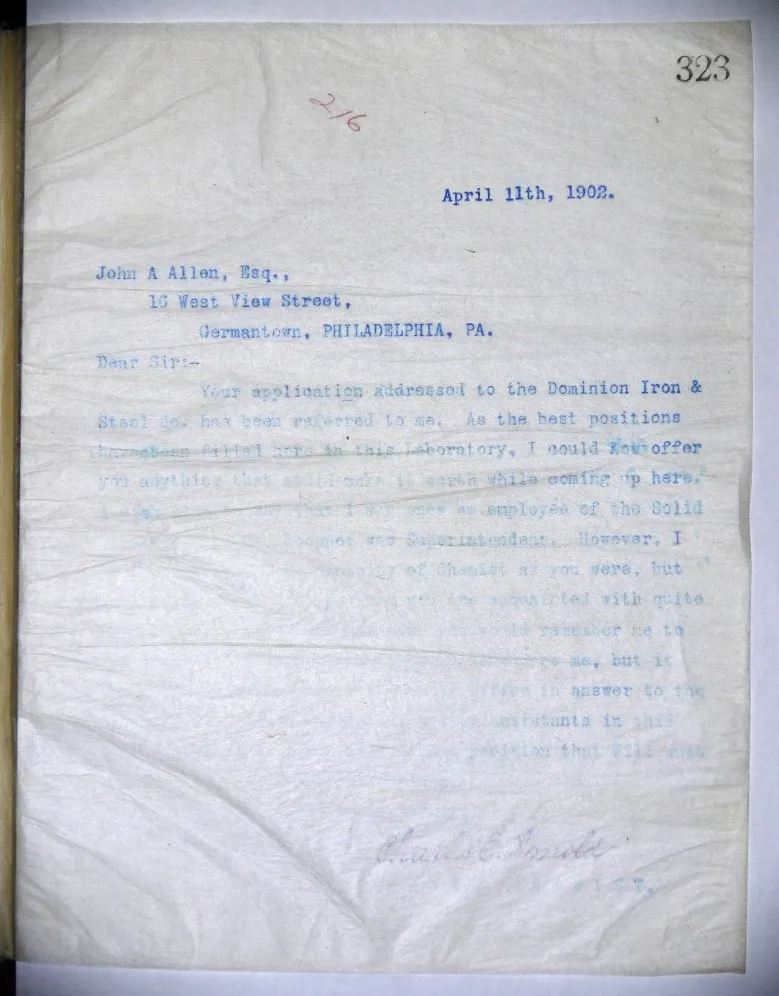
A typed letter from 1902, its lower half washed to a ghost by damp and age, recovered to even readable ink - signature and all. Drag the seam: it is the same page, before and after.
One precious page, or a whole shelf of them. Faded Text Repair runs the same either way — here is the damage it takes on, and the records it runs across.
and the records it runs across
Why this is harder than it looks
Everything that puts ink on paper eventually stops holding it. Thermal receipts go blank in a drawer. Toner lifts off a photocopy. Iron gall ink burns pale and fibrous. Turning up the contrast on a scanner makes the survivors darker and the casualties invisible - it does not recover anything.
What this handles
- Thermal receipts and boarding passes faded to near-blank
- Toner dropout and ghosting on photocopies
- Dot-matrix and continuous-feed printing gone grey
- Faded fountain and ballpoint ink on old letters
- Sun-bleached certificates and light-struck pages
- Carbon copies where only the pressure marks survive
How faded text repair runs
The same three moves on every job, and the third one is the part most tools skip.
Measure what survives
The page is separated into paper and ink. Stroke fragments too faint for a scanner threshold are still found, because they are found by shape rather than by brightness.
Restore stroke density
Each surviving stroke is brought back to the weight it was printed at, using the letterforms elsewhere on the page as the reference for the typeface or hand.
Read it back
The restored page is read as text and compared against what was legible before. Anything that appeared out of nowhere is flagged, not delivered.
What actually happens to the page
Three things happen on every faded-text job, and the third is the part most tools skip.
It finds strokes a scanner threshold throws away
Turning up the scanner darkens the survivors and makes the casualties invisible. Docovly separates paper from ink first, then finds stroke fragments by their shape rather than their brightness - which is why it recovers text a threshold has already given up on.
- Page split into paper and ink layers
- Faint fragments located by letterform, not luminance
- Works on thermal, toner, carbon and dot-matrix
Each stroke returned to the weight it was printed at
A thin serif must not become a blob, and a character that was never there must not appear. Recovery is constrained to the strokes actually present, taking the typeface or the hand from the rest of the page as its reference.
- No character added where no stroke evidence survives
- Typeface weight and hand preserved
- Recovery strength set locally, not page-wide
The restored page is read back and checked against itself
The page is read as text and compared with what was legible before. Anything that appeared out of nowhere is flagged rather than delivered - because on a receipt or a prescription, an invented word is worse than a blank.
- Restored text compared to the pre-repair read
- New-from-nowhere words surfaced for review
- Confidence and source crop travel with each field
Built to be trusted at the edges
Faded Text Repair is one capability inside a pipeline built on a single idea: a restoration you cannot trust at the edges is a picture of one.
Everything is read back
Every restored page is read as text and compared against what was legible before, so nothing appears out of nowhere without being flagged.
The original is never lost
The untouched capture is always delivered beside the restoration - the recovery is a new version, never an overwrite.
Refusals are the product
What cannot be recovered is marked, not guessed. The guarantee is built into how the pipeline runs, not asked of a model.
It reads back as data
Fields come out checked against the document's own arithmetic, with withheld values kept in their own column - never mixed with blanks.
One sheet or a whole shelf
Per-page isolation means a single difficult document never stops the run - each page keeps its own progress, result and failure.
Free to try, no card
Free to start, no watermark, and if a document is not recoverable we would rather tell you than sell you a plan.
Where a general-purpose tool goes wrong
The same document, two philosophies. One optimises for a convincing picture; the other for a correct one - and says so when those two part ways.
What most tools do
- One global contrast curve for the whole sheet
- Darkens survivors, erases everything faint
- Invents plausible words to fill the gaps
- No way to know which words it guessed
What Docovly does
- Per-stroke recovery against the page's own hand
- Faint fragments found by shape and rebuilt
- Unreadable regions marked, never filled
- Every restored page read back and compared
What it will not do
Enforced by how the pipeline is built rather than by instructions given to a model - which is the only kind of guarantee worth writing down.
- 1No character is added where no stroke evidence survives
- 2Typeface weight and letterforms are preserved, never re-set
- 3Unrecoverable regions are reported rather than filled in
stroke
level recovery, not page level
4
ink types: thermal, toner, pencil, fountain
0
characters generated to fill a gap
100%
of pages read back after repair
Consoles that use this capability
Faded Text Repair, answered
What people ask before sending us a document with this kind of damage.
Have a document you are not sure about?
Send us a photograph of it. We will tell you honestly whether it is recoverable before you spend anything.
Ask usContrast is a global operation: it darkens what is already there and destroys everything in between. Faded text repair is local and structural - it identifies each stroke and restores that stroke's density, which is why it recovers text a contrast slider cannot touch.
Send us the damaged one
Free to start, no card. If your document is not recoverable, we would rather tell you that than sell you a plan.