Point at the tear. Only the tear is rebuilt
Whole-page restoration is the wrong instrument for a single tear: it re-renders a perfectly good document to fix two centimetres of it. Targeted repair takes a marked region and rebuilds inside it alone, compositing back with a feathered edge, so every untouched pixel is provably untouched.
- region-only
- nothing outside the mark is touched
- feathered
- composited back invisibly
- versioned
- each repair its own revertible step
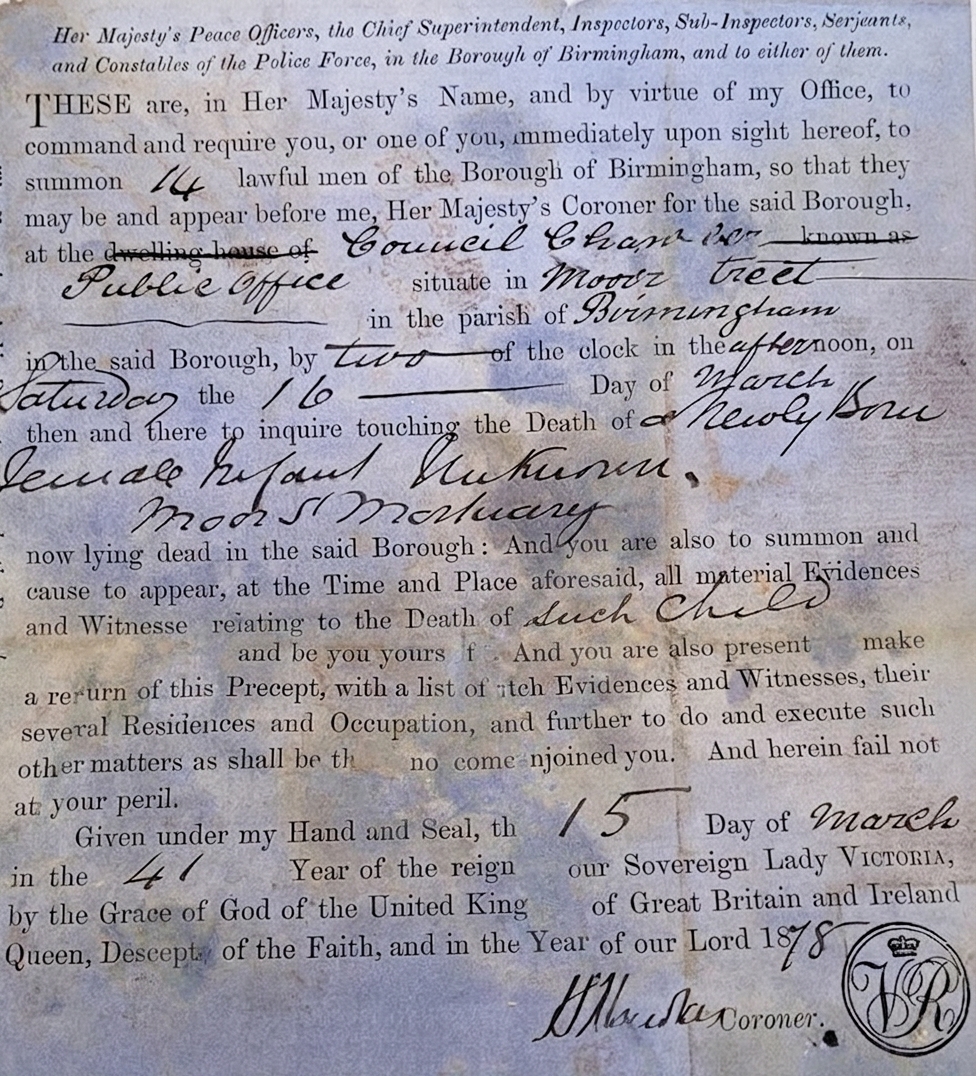
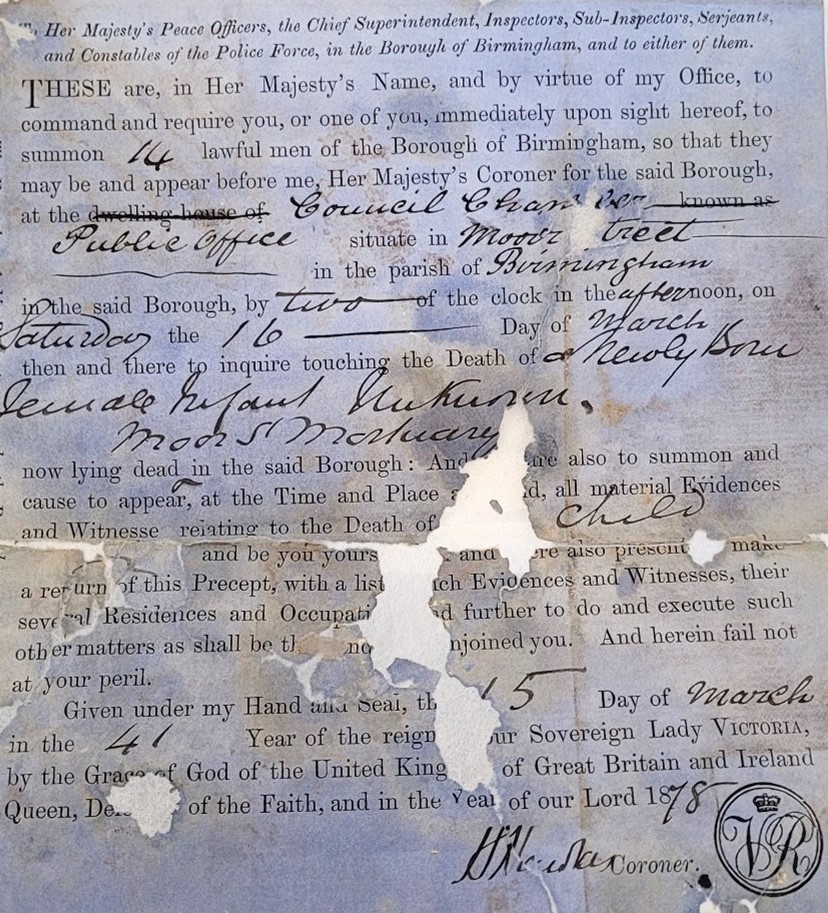
An 1878 coroner's precept eaten through by holes and loss, rebuilt from the paper and pattern around each gap. Only the marked regions are touched - the rest of the sheet stays the original.
One precious page, or a whole shelf of them. Tear & Hole Repair runs the same either way — here is the damage it takes on, and the records it runs across.
and the records it runs across
Why this is harder than it looks
A folded document eventually splits along the fold. Staples rust through. Punch holes land on a date. In all these cases the document is fine and one small area is not - and re-processing the whole sheet to fix it introduces risk everywhere for a benefit in one place.
What this handles
- Splits along an old fold line
- Torn edges and separated halves
- Rusted staple and paperclip holes
- Punch holes through printed text
- Tape lifts that took the surface with them
- Chipped and crumbling brittle edges
How tear & hole repair runs
The same three moves on every job, and the third one is the part most tools skip.
Mark the region
Paint over the damage in the browser. The mark defines the working area and nothing outside it enters the repair at all.
Rebuild inside
Paper, texture and any structural pattern crossing the tear are continued through the marked area from both sides of the break.
Composite back
The repair is feathered into the original sheet, so the join is invisible while the rest of the file remains bit-for-bit the original.
What actually happens to the page
Targeted repair is three moves, and the guarantee comes from the first one.
Paint over the damage - roughly right is enough
The mark defines the working area, and nothing outside it enters the repair at all. You are indicating where to look rather than tracing the tear yourself; the exact boundary of the damage is found within the region you paint.
- Rough marking, precise boundary found inside it
- Nothing outside the mark is read or altered
- Pixels beyond the region provably untouched
Paper and structure continued through the break
Paper, texture and any structural pattern crossing the tear are continued through the marked area from both sides of the break. Where a text region falls inside a genuine loss, it is marked as a gap rather than filled.
- Structure joined from both sides of the tear
- Brittle chipped edges rebuilt as paper
- Text crossing a loss marked, never invented
Feathered into the original, and each repair reverts alone
The repair is feathered into the surrounding sheet, so the join is invisible at normal size while the rest of the file stays the original. Each repair lands as its own version, so you can revert one tear without losing the others.
- Invisible feathered join at viewing size
- Repaired regions renderable as an overlay
- Every repair a separate, revertible version
Built to be trusted at the edges
Tear & Hole Repair is one capability inside a pipeline built on a single idea: a restoration you cannot trust at the edges is a picture of one.
Everything is read back
Every restored page is read as text and compared against what was legible before, so nothing appears out of nowhere without being flagged.
The original is never lost
The untouched capture is always delivered beside the restoration - the recovery is a new version, never an overwrite.
Refusals are the product
What cannot be recovered is marked, not guessed. The guarantee is built into how the pipeline runs, not asked of a model.
It reads back as data
Fields come out checked against the document's own arithmetic, with withheld values kept in their own column - never mixed with blanks.
One sheet or a whole shelf
Per-page isolation means a single difficult document never stops the run - each page keeps its own progress, result and failure.
Free to try, no card
Free to start, no watermark, and if a document is not recoverable we would rather tell you than sell you a plan.
Where a general-purpose tool goes wrong
The same document, two philosophies. One optimises for a convincing picture; the other for a correct one - and says so when those two part ways.
What most tools do
- Re-renders the whole page to fix one tear
- Introduces risk everywhere for a fix in one place
- Guesses text that crossed the loss
- One irreversible pass over the entire sheet
What Docovly does
- Rebuilds inside the marked region alone
- Every pixel outside the mark left unmodified
- Text inside a loss marked, not invented
- Each repair its own revertible version
What it will not do
Enforced by how the pipeline is built rather than by instructions given to a model - which is the only kind of guarantee worth writing down.
- 1Pixels outside the marked region are unmodified
- 2Each repair lands as its own revertible version
- 3Text crossing a loss is marked, not invented
region
only the marked area is altered
0
pixels changed outside the mark
feathered
join, invisible at viewing size
per-repair
versioning - revert one, keep the rest
Tear & Hole Repair, answered
What people ask before sending us a document with this kind of damage.
Have a document you are not sure about?
Send us a photograph of it. We will tell you honestly whether it is recoverable before you spend anything.
Ask usRoughly right is enough. The exact boundary of the damage is traced within the region you paint, so you are indicating where to look rather than tracing the tear yourself.
Also in Repair damage
Send us the damaged one
Free to start, no card. If your document is not recoverable, we would rather tell you that than sell you a plan.