One side of the page at a time
Thin paper shows its own back. On a double-sided transcript or a carbon-copy contract, the reverse ghosts through and confuses everything downstream - the eye, the OCR, and any model reading the page. Show-through is identified as reversed geometry and removed, leaving the side you asked for.
- mirror
- matched show-through detection
- per-density
- removal, not a blanket threshold
- both faces
- corrected independently
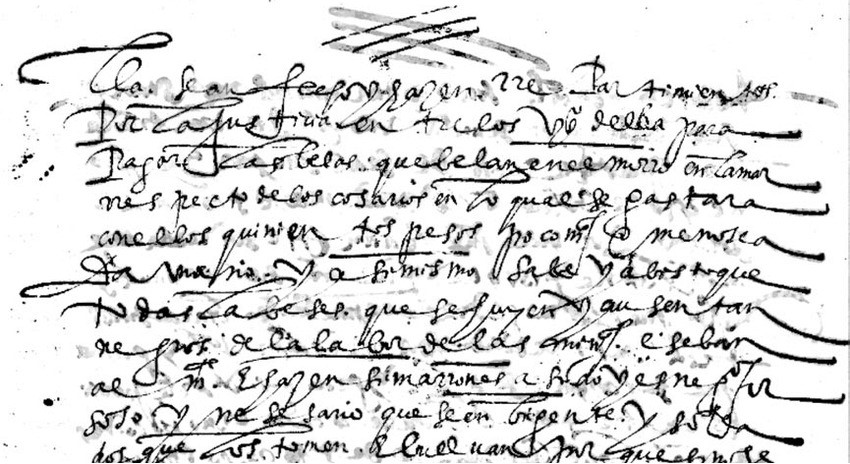
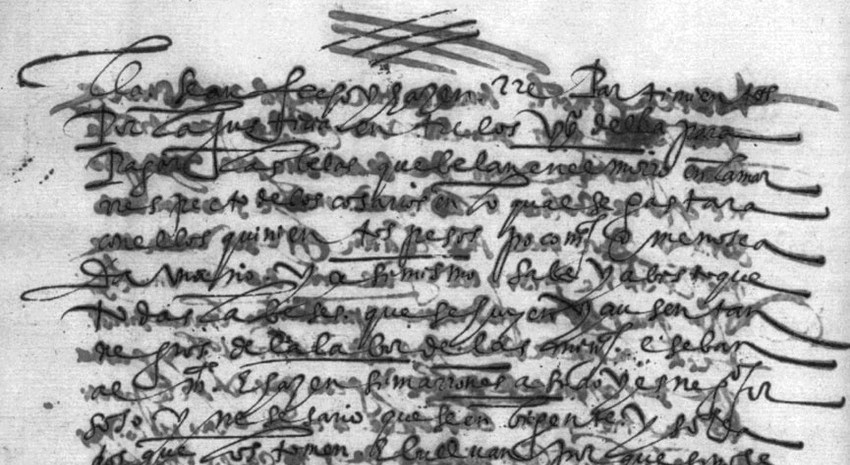
A page where the reverse side ghosted through and the ink had feathered, cleared to one clean face. Drag the seam - the show-through lifts, the writing stays.
One precious page, or a whole shelf of them. Ink Bleed & Show-through runs the same either way — here is the damage it takes on, and the records it runs across.
and the records it runs across
Why this is harder than it looks
Show-through is not noise; it is real text in the wrong place. It reads as content to anything that does not know to look for the mirror, which is why bleed-through corrupts captured data more often than actual damage does.
What this handles
- Reverse page ghosting through onionskin
- Double-sided transcripts and contracts
- Iron gall ink burning through the fibre
- Feathered ballpoint on absorbent paper
- Marker and highlighter strike-through
- Carbon copy shadowing
How ink bleed & show-through runs
The same three moves on every job, and the third one is the part most tools skip.
Identify the mirror
Show-through appears as the reverse of the other side. It is matched geometrically, which distinguishes it from anything genuinely printed on this face.
Subtract the layer
The ghosted layer is removed at the density it appears, so faint show-through is subtracted lightly and heavy bleed heavily.
Recover the feathering
Where ink has spread into the fibre, stroke edges are tightened back toward the shape the pen actually made.
What actually happens to the page
Show-through is not noise - it is real text in the wrong place. Removing it safely means proving it belongs to the other side before touching it.
The ghost is matched as the reverse of the other side
Show-through appears as the reverse of the opposite face. It is matched geometrically, which is what distinguishes it from anything genuinely printed on this side. Upload both faces and the match is exact; with one, it is detected from its own reversed structure.
- Ghost matched as mirrored geometry
- Both faces give an exact mirror match
- One face still handles the common cases
Removed per density, not by a blanket threshold
The ghosted layer is removed at the density it appears - faint show-through subtracted lightly, heavy bleed heavily. Only content matching a mirrored geometry at low density qualifies, so real text is specifically protected from being taken as a ghost.
- Faint and heavy bleed treated differently
- Real text on the face never qualifies as ghost
- Both faces corrected independently when supplied
Spread ink is tightened toward the stroke's true shape
Where ink has feathered into the fibre, stroke edges are pulled back toward the shape the pen actually made. Iron gall ink burning through is chemical, not optical - so it is treated as a loss on the reverse while the writing side is corrected normally.
- Feathered edges tightened to the true stroke
- Iron gall burn-through treated as a loss
- Writing side corrected while the burn is marked
Getting the cleanest correction
Show-through correction is careful by design. A couple of habits at capture make the mirror match exact and the result safest.
Upload both faces
With both sides available the mirror match is exact. It still works from one face, but two removes the guesswork.
Real text is protected
Only content matching a mirrored geometry at low density is removed; anything ambiguous is left alone rather than deleted.
Density, not threshold
Removal follows the strength of the ghost, so faint onionskin and heavy carbon are each handled on their own terms.
Burn-through is marked
Iron gall ink eating through the fibre is chemical damage - handled as a loss on the reverse, not scrubbed as a stain.
Built to be trusted at the edges
Ink Bleed & Show-through is one capability inside a pipeline built on a single idea: a restoration you cannot trust at the edges is a picture of one.
Everything is read back
Every restored page is read as text and compared against what was legible before, so nothing appears out of nowhere without being flagged.
The original is never lost
The untouched capture is always delivered beside the restoration - the recovery is a new version, never an overwrite.
Refusals are the product
What cannot be recovered is marked, not guessed. The guarantee is built into how the pipeline runs, not asked of a model.
It reads back as data
Fields come out checked against the document's own arithmetic, with withheld values kept in their own column - never mixed with blanks.
One sheet or a whole shelf
Per-page isolation means a single difficult document never stops the run - each page keeps its own progress, result and failure.
Free to try, no card
Free to start, no watermark, and if a document is not recoverable we would rather tell you than sell you a plan.
Where a general-purpose tool goes wrong
The same page, two philosophies. One optimises for a convincing picture; the other for a correct one - and says so when those two part ways.
What most tools do
- Thresholds the whole page and hopes
- Deletes faint real text along with the ghost
- Cannot tell this face from the reverse
- Treats chemical burn-through as a stain
What Docovly does
- Ghost matched as mirrored geometry first
- Removed per density, real text protected
- Both faces corrected independently
- Iron gall burn-through marked as a loss
What it will not do
Enforced by how the pipeline is built rather than by instructions given to a model - which is the only kind of guarantee worth writing down.
- 1Content on the requested face is never removed as show-through
- 2Both faces are corrected independently when both are supplied
- 3Removal is per-density, not a blanket threshold
mirror
matched detection, not a threshold
per-density
removal, faint to heavy
2 faces
corrected independently when supplied
protected
real text on the requested face
Consoles that use this capability
Ink Bleed & Show-through, answered
What people ask before sending us a document that needs this kind of clean-up.
Have a document you are not sure about?
Send us a photograph of it. We will tell you honestly whether it is recoverable before you spend anything.
Ask usIt works better if you do - with both faces available the mirror match is exact. With only one, show-through is detected from its own reversed structure, which handles the common cases well.
Also in Clean the page
Put the messy one in first
The grimy, folded, badly-photographed page you assumed was a lost cause. Free to start, no card, and the original is never overwritten.