Most damage happens at capture, not in storage
A document photographed at an angle on a kitchen table arrives keystoned, unevenly lit and half in shadow. None of that is damage to the document - it is damage to the capture, and it has to be corrected before any restoration can mean anything.
- phone-first
- capture, corrected on every job
- true-rect
- perspective undone, not stretched
- before
- restoration - correction runs first
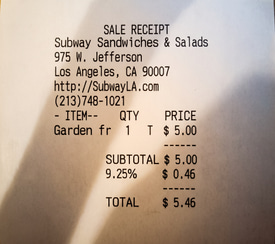
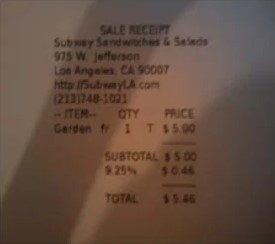
A receipt photographed in poor light - dark, soft and skewed - corrected to a sharp, evenly-lit, straight page. Drag the seam.
One precious page, or a whole shelf of them. Scan & Photo Correction runs the same either way — here is the damage it takes on, and the records it runs across.
and the records it runs across
Why this is harder than it looks
People photograph documents with a phone, because that is what they have. The result is trapezoidal, lit from one side, with a shadow from the person holding the camera and glare from whatever is above them. Restore that as-is and you have restored the lighting.
What this handles
- Keystoning from a camera held at an angle
- Uneven lighting across the sheet
- The photographer's own shadow on the page
- Glare from glass, frames and laminate
- Camera shake and soft focus
- Skewed and rotated scans
How scan & photo correction runs
The same three moves on every job, and the third one is the part most tools skip.
Find the sheet
The document's edges are located within the photograph and the page is rectified to its true rectangle, undoing perspective.
Even the light
The illumination across the sheet is modelled and neutralised, removing shadow gradients and hotspots without flattening the paper.
Recover sharpness
Camera shake and soft focus are corrected against the letterform structure, so text sharpens without haloing.
What actually happens to the page
People photograph documents with a phone, because that is what they have. Correcting the capture is the first thing that runs on every job - restore it as-is and you have restored the lighting.
The page is rectified to its true rectangle
The document's edges are located inside the photograph and the perspective is undone, so a trapezoid shot from an angle becomes the rectangle it actually is. Aspect ratio and true page proportions are restored rather than stretched to fit a frame.
- Edges located within the photo
- Keystoning and skew undone
- True proportions restored, not stretched
The photographer's shadow and hotspots are removed
The illumination across the sheet is modelled and neutralised, lifting the shadow gradient the person holding the camera cast and the hotspot from whatever was above them - without flattening the paper's own texture in the process.
- Shadow gradients and hotspots neutralised
- Paper texture left intact, not flattened
- Reflections from glass separated from the page
Shake and soft focus corrected; glare told the truth about
Camera shake and soft focus are corrected against the letterform structure, so text sharpens without haloing. Where glare has blown out all detail, it is reported instead of reconstructed - and two captures at different angles improve reflections considerably.
- Shake and soft focus corrected on the letterforms
- Blown-out glare reported, never faked
- Two angles improve glass and laminate captures
Getting a good capture from a phone
Capture correction assumes a phone is what you have. A few small habits give it the most to work with.
Whole sheet in frame
Keep every edge of the document visible and reasonably lit; the page is found and rectified from those edges.
Two angles for glass
For framed or laminated documents, upload two captures from different angles - reflections separate far better.
Correction runs first
Rectify and relight happen before any restoration, so the recovery works on the document, not on the lighting.
Glare is honest
A blown-out highlight with no detail beneath it is reported rather than reconstructed - the fix is another photo.
Built to be trusted at the edges
Scan & Photo Correction is one capability inside a pipeline built on a single idea: a restoration you cannot trust at the edges is a picture of one.
Everything is read back
Every restored page is read as text and compared against what was legible before, so nothing appears out of nowhere without being flagged.
The original is never lost
The untouched capture is always delivered beside the restoration - the recovery is a new version, never an overwrite.
Refusals are the product
What cannot be recovered is marked, not guessed. The guarantee is built into how the pipeline runs, not asked of a model.
It reads back as data
Fields come out checked against the document's own arithmetic, with withheld values kept in their own column - never mixed with blanks.
One sheet or a whole shelf
Per-page isolation means a single difficult document never stops the run - each page keeps its own progress, result and failure.
Free to try, no card
Free to start, no watermark, and if a document is not recoverable we would rather tell you than sell you a plan.
Where a general-purpose tool goes wrong
The same page, two philosophies. One optimises for a convincing picture; the other for a correct one - and says so when those two part ways.
What most tools do
- Restores the photo, lighting and all
- Stretches a trapezoid to fill the frame
- Bakes the photographer's shadow into the result
- Sharpens into halos and fakes blown-out glare
What Docovly does
- Corrects the capture before restoring anything
- Rectifies to the true rectangle, proportions kept
- Models and removes uneven light and shadow
- Sharpens on letterforms; reports dead glare
What it will not do
Enforced by how the pipeline is built rather than by instructions given to a model - which is the only kind of guarantee worth writing down.
- 1Aspect ratio and true page proportions are restored, not stretched
- 2Glare regions are reported when nothing survives beneath them
- 3Correction runs before restoration, never after
phone
captures corrected on every job
true-rect
perspective undone, not stretched
first
correction runs before restoration
reported
glare with nothing beneath it
Scan & Photo Correction, answered
What people ask before sending us a document that needs this kind of clean-up.
Have a document you are not sure about?
Send us a photograph of it. We will tell you honestly whether it is recoverable before you spend anything.
Ask usFor most documents, yes - if the whole sheet is in frame and reasonably lit. Capture correction is built on the assumption that a phone is what you have, and it is the first thing that runs on every job.
Also in Clean the page
Put the messy one in first
The grimy, folded, badly-photographed page you assumed was a lost cause. Free to start, no card, and the original is never overwritten.